Best GPT Image 2 Prompts (2026): 8 Real Examples with 99% Text Accuracy
Best GPT Image 2 Prompts (2026): 8 Real Examples with 99% Text Accuracy
OpenAI released GPT Image 2 (ChatGPT Images 2.0) on 2026-04-21. Two days of stress-testing later, it's clear this model isn't a minor upgrade — it's the first image model where you can actually write the text you want on a sign, poster, or product label and have it render correctly, in 4K, without regenerating 20 times.
This post walks through 8 hand-picked prompts with their real outputs, organized by the capability they showcase. Every image here was generated in a single shot through the openai/gpt-image-2 API — no cherry-picking, no Photoshop retouching. All prompts are copy-paste ready.
If you want the full 40-prompt library with a one-click "Try this prompt" button, jump to nanowow.ai/gpt-image-2/prompts.
Why GPT Image 2 is different
Four capabilities separate it from DALL-E 3 and Midjourney:
- ~99% text rendering accuracy — storefronts, movie posters, book covers, menus. What you type in quotes is what you get.
- Native multilingual text — Japanese, Korean, Chinese, Hindi, Arabic all render with correct ligatures and strokes. No more invented glyphs.
- 4K output (3840×2160) — print-ready without any upscaling.
- Subject-lock editing via
input_fidelity— keep a product pixel-identical while swapping background, lighting, or on-label text.
The secret to getting good results, though, isn't just knowing the capabilities. It's how you structure the prompt.
The 5-slot prompt structure
Every viral GPT Image 2 prompt I've dissected follows the same five-part structure:
- Scene — where, when, camera angle
- Subject — what's in focus, plus any exact text in quotes
- Details — materials, lens, lighting, film stock, color palette
- Use case — "editorial", "catalog", "photojournalism", "poster"
- Exclusions — "no watermarks", "render text once, verbatim", "no invented glyphs"
Generic adjectives like "beautiful" or "cinematic" barely move the needle. Citing a specific film stock, photographer style reference, camera body, or city location unlocks a whole different class of output.
Let's see this in action.
1. Typography that actually reads
Prompt:
Photoreal 35mm photograph of a hand-painted diner window in Pittsburgh at 6:47 AM, shot from a parked car across the street. Window lettering in gold-leaf serif with black drop-shadow reads exactly: "JOANNE'S — BREAKFAST ALL DAY — EST. 1978". Below in smaller red cursive: "Pie by the slice $4.25". Reflection shows a Ford F-150 and overcast sky. Kodak Portra 400, 50mm f/2, shallow DoF. No watermarks, render text once, verbatim.
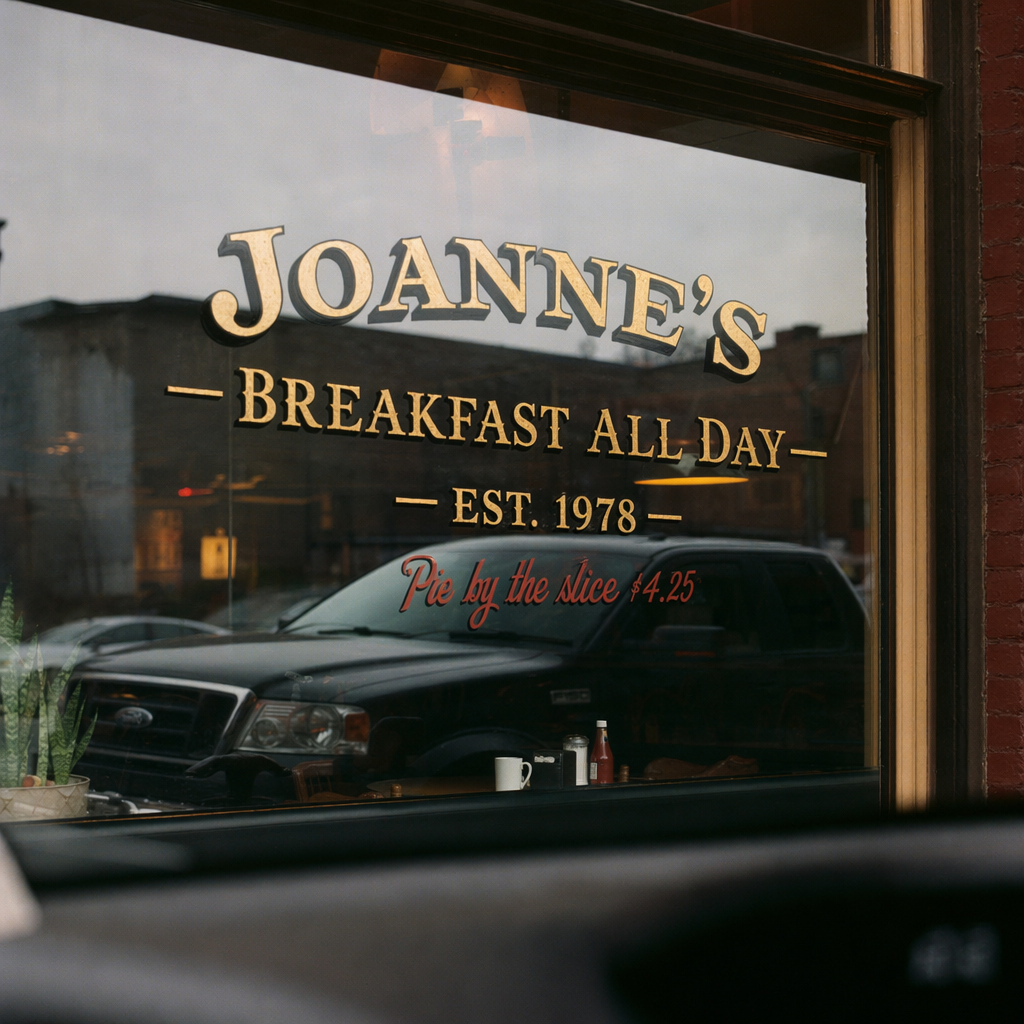
Three words are hard for DALL-E 3, let alone a full diner sign plus a second line of cursive. GPT Image 2 got both lines in one shot. Note the prompt cites Kodak Portra 400 + 50mm f/2 — not "cinematic film look". That specificity matters.
2. Poster-grade typography with strict kerning
Prompt:
A1 indie film poster in the style of Saul Bass, matte black background, stacked orange geometric shapes forming a staircase. Title in bold condensed sans reads exactly "THE LAST ELEVATOR". Below in thin mono type: "A FILM BY CHLOE ARIN · IN THEATERS OCTOBER 17". Credits block bottom center in 7pt Helvetica, fully legible. Clean kerning, single occurrence of every text block, no logos beyond those specified.
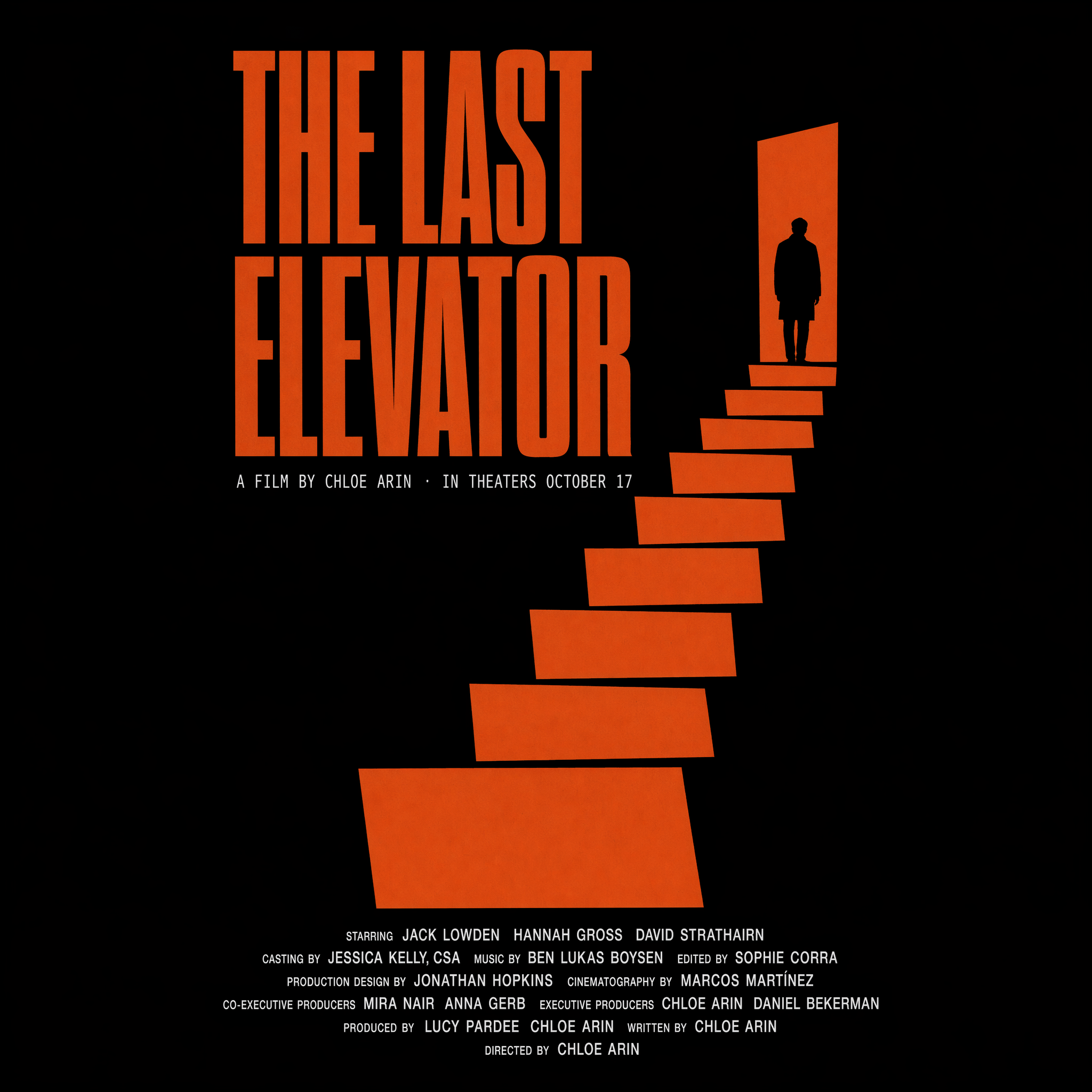
The 7pt Helvetica credits block is the tell. Previous-gen models produce "hieroglyphic-lookalike" credits — vaguely text-shaped smudges. GPT Image 2 produces legible type at 7pt.
3. Non-Latin scripts, natively
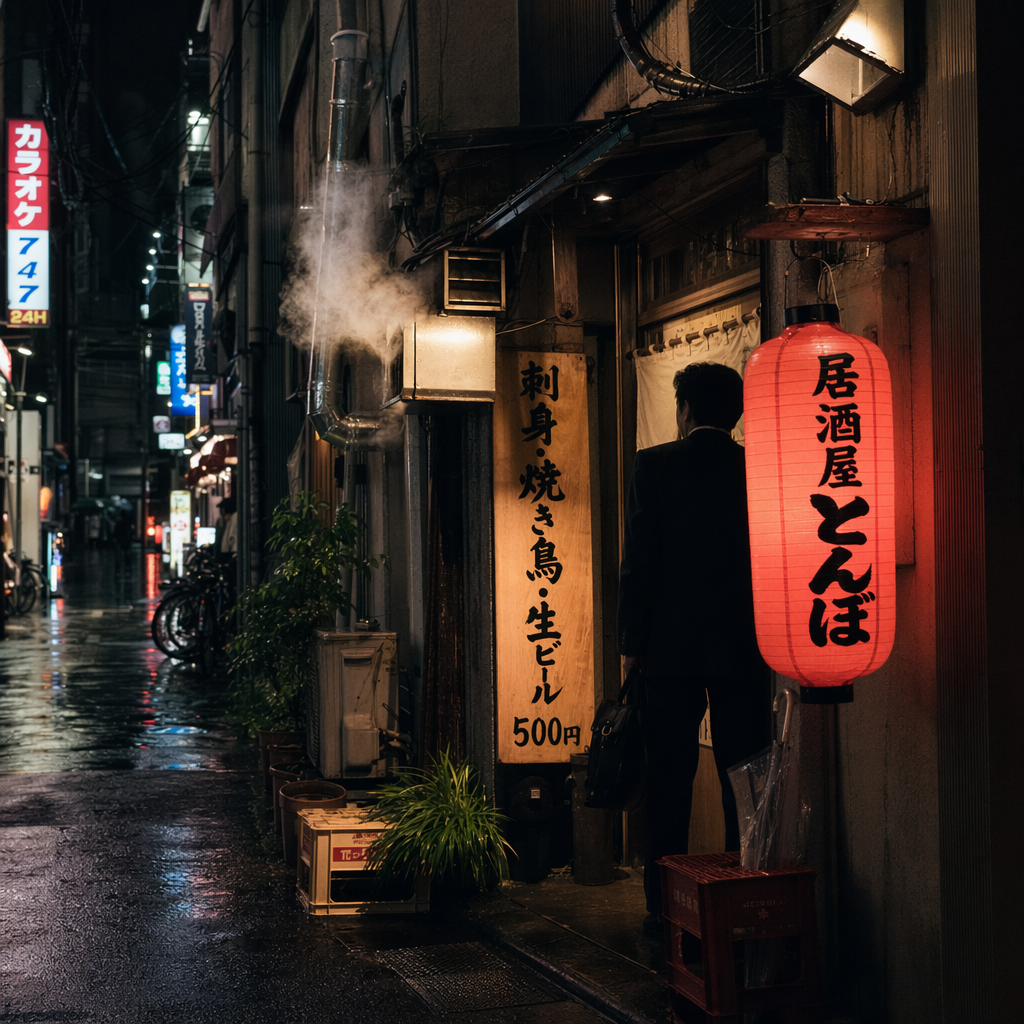
Japanese prompt:
Shinjuku back-alley izakaya at 11 PM, shot from across the street on a rainy Tuesday. Red chochin lantern reads exactly "居酒屋 とんぼ". Vertical wooden sign in black sumi strokes reads exactly "刺身・焼き鳥・生ビール 500円". Steam from ducted vent, wet asphalt reflecting neon, salaryman silhouette in doorway. Fujifilm X100V look, 23mm, f/2, ISO 1600. All Japanese text rendered verbatim, no invented characters.
Korean prompt:
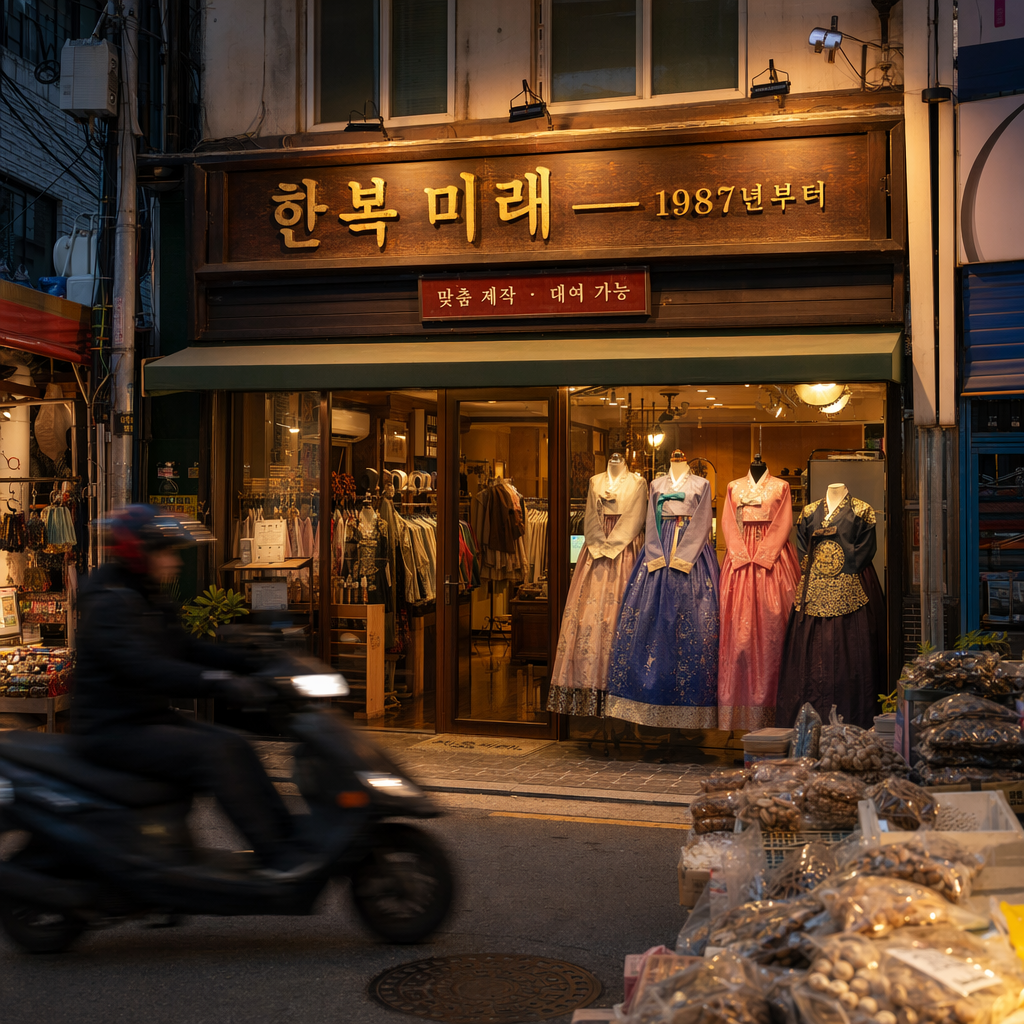
Seoul Mangwon market storefront at dusk. Hanbok-shop signage in lacquered wood reads exactly "한복 미래 — 1987년부터". Smaller red placard: "맞춤 제작 · 대여 가능". Warm tungsten spill, passing scooter motion-blurred. Photojournalism framing, Sony A7IV 35mm. Do not romanize; render Hangul characters exactly as given.
Arabic prompt:
Cairo Khan el-Khalili spice stall at golden hour. Hand-painted Arabic signboard in thuluth script reads exactly "بهارات المعز — منذ ١٩٣٤". Burlap sacks of sumac, cardamom, turmeric with small price cards in Arabic numerals. Shopkeeper out of focus, weighing spices on a brass scale. Documentary 35mm, shallow DoF. Arabic right-to-left, correct ligatures, no Latin substitutions.
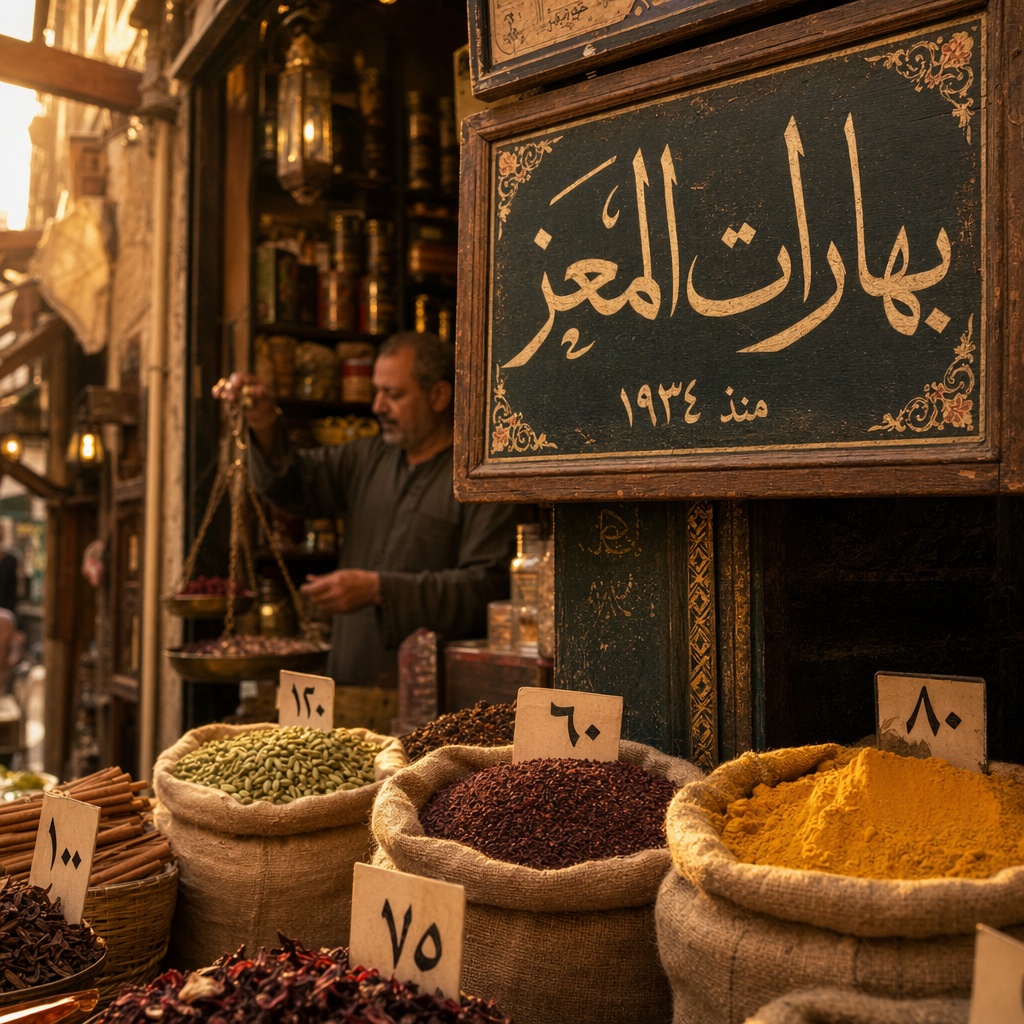
The explicit "no invented glyphs" and "right-to-left, correct ligatures" constraints matter. Without them, even GPT Image 2 occasionally produces decorative pseudo-characters. With them, real CJK/Arabic renders correctly.
4. 4K product photography with label fidelity
Prompt:
Editorial product photo at 4K, 3840×2160, 3:2. A single matte-ceramic Aesop Resurrection hand balm tube standing on wet river slate, backlit at 7 AM by raking side light through a skylight. Water droplets beading on label. Label reads exactly "Aesop · Resurrection Aromatique Hand Balm · 75ml". Hasselblad X2D look, 80mm f/5.6, no retouching halo, no shadow softness — sharp pore-level texture on ceramic.
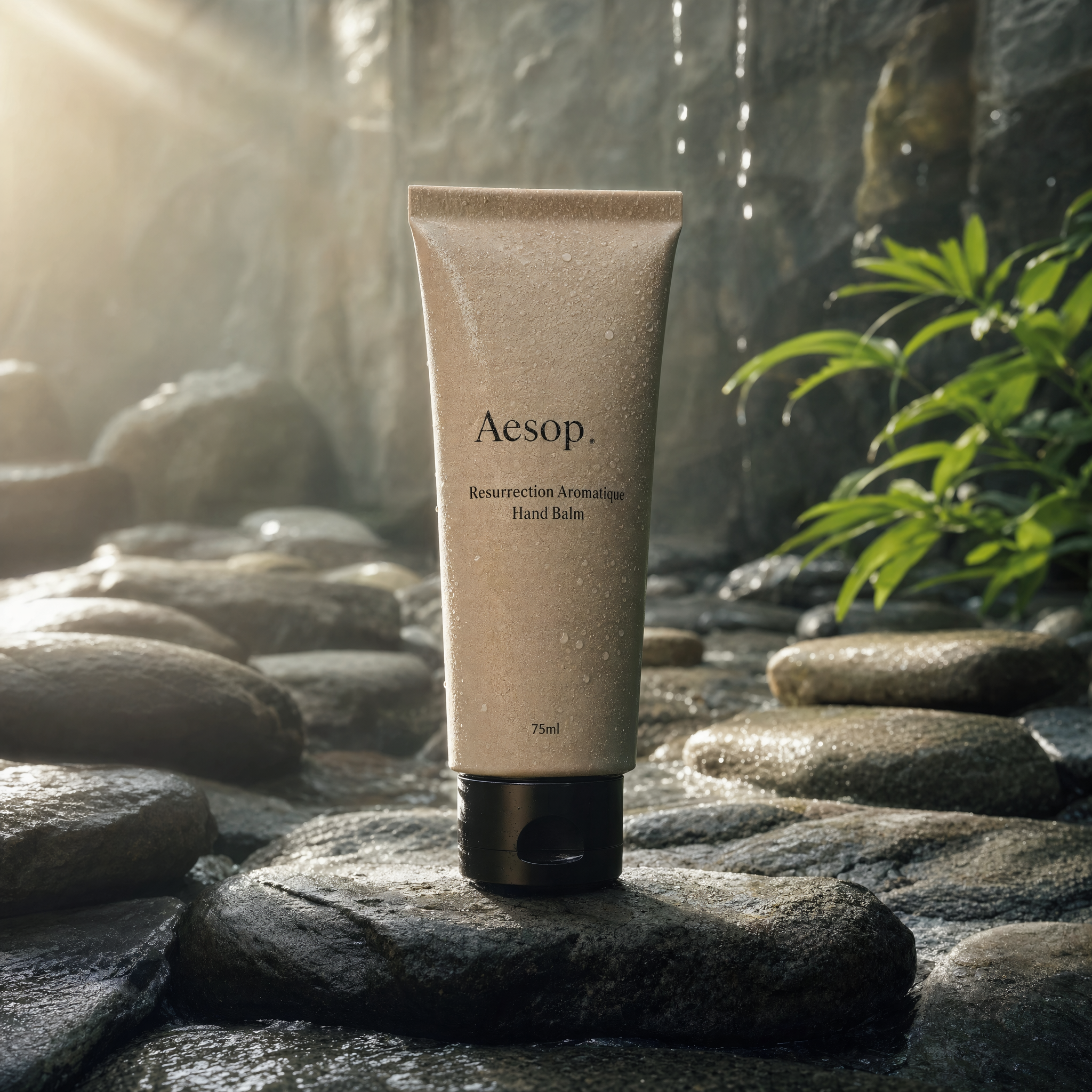
This is the use case ecommerce sellers care about: a real product label rendered correctly at 4K, with the exact lighting setup described. The Hasselblad X2D reference steers the model toward medium-format sharpness instead of AI-smooth.
Swiss watch prompt:
4K hero shot for a fictional Swiss brand. A brushed titanium mechanical wristwatch, open caseback showing movement, suspended above a black walnut desk at 45° angle. Dial text reads exactly "KRAMER · GENÈVE · AUTOMATIC 42h". Blue polished hands, no logo on crown. Studio softbox 60°, rim light at 210°, f/11 focus-stack sharp edge-to-edge. Catalog-grade, no backdrop blur, no compositing seams.
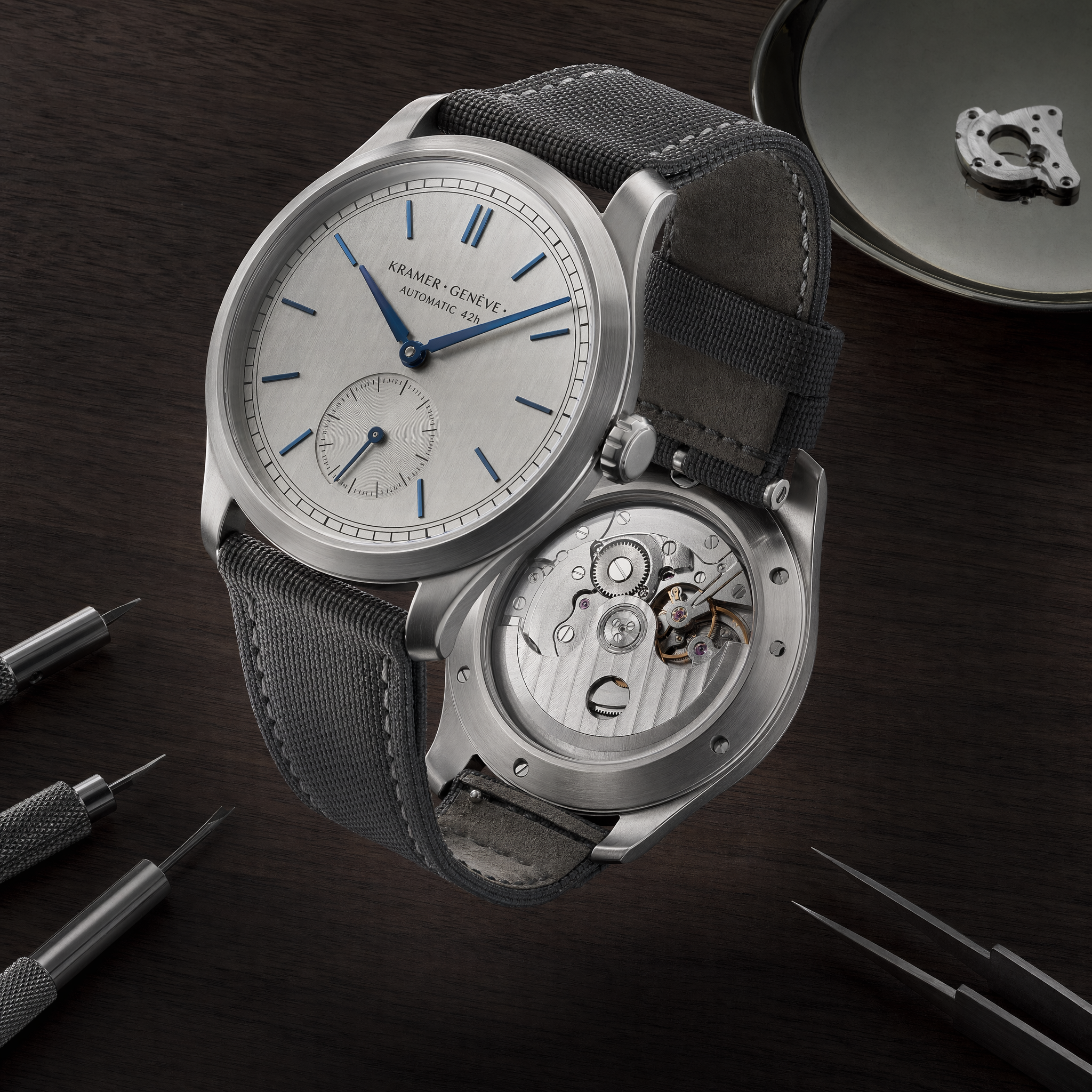
Notice how the prompt specifies the exact light setup (softbox at 60°, rim light at 210°). GPT Image 2 respects lighting geometry if you give it coordinates.
5. Editorial portraits with honest skin
Prompt:
Editorial portrait for The New Yorker profile: a 58-year-old Nigerian-British architect in her office in Shoreditch, London. Dressed in a charcoal Issey Miyake pleated blazer over a white shirt. Arms crossed loosely, slight half-smile, looking past camera. North-facing window light, concrete walls, Eames chair partially visible. Medium-format (Fujifilm GFX), 80mm f/2, 4:5. Honest skin texture, visible pores and fine lines, no retouching, no glamour lighting.
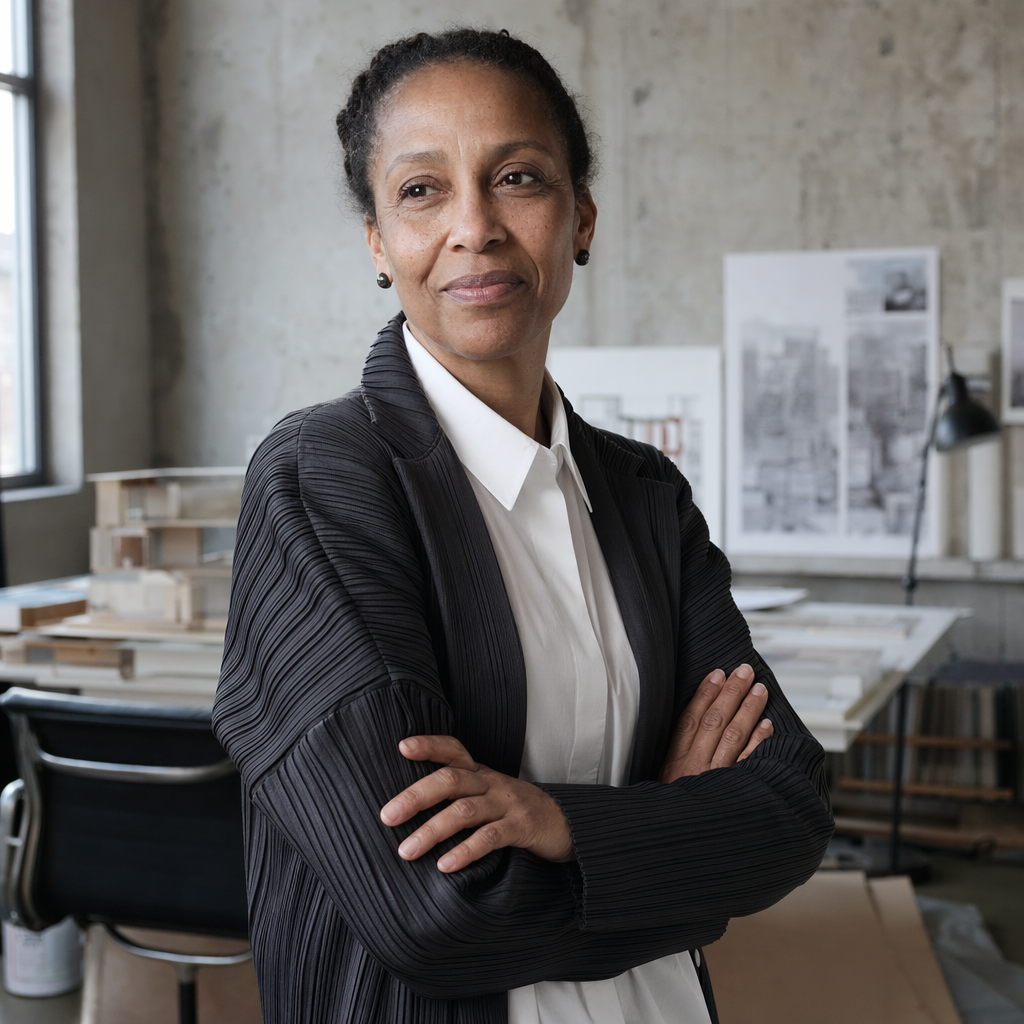
The phrase "honest skin texture, visible pores and fine lines, no retouching" is the single most powerful constraint for avoiding AI-plastic faces. Combined with a named publication (The New Yorker), the model reaches for a specific visual tradition rather than generic "professional portrait".
6. Complex creative scenes
Song Dynasty × Tokyo Yamanote line:
Dense Song Dynasty-styled scroll painting reimagined as a modern city map of Tokyo's Yamanote line, ink wash on aged silk. Stations rendered as miniature pavilions, trains as boats, Shinjuku as the largest temple complex. Calligraphic cartouche top-right reads exactly "東京循環鐵道圖 · 令和八年". 3840×2160, museum-archive print quality, no modern type, brush-stroke texture visible at full crop.
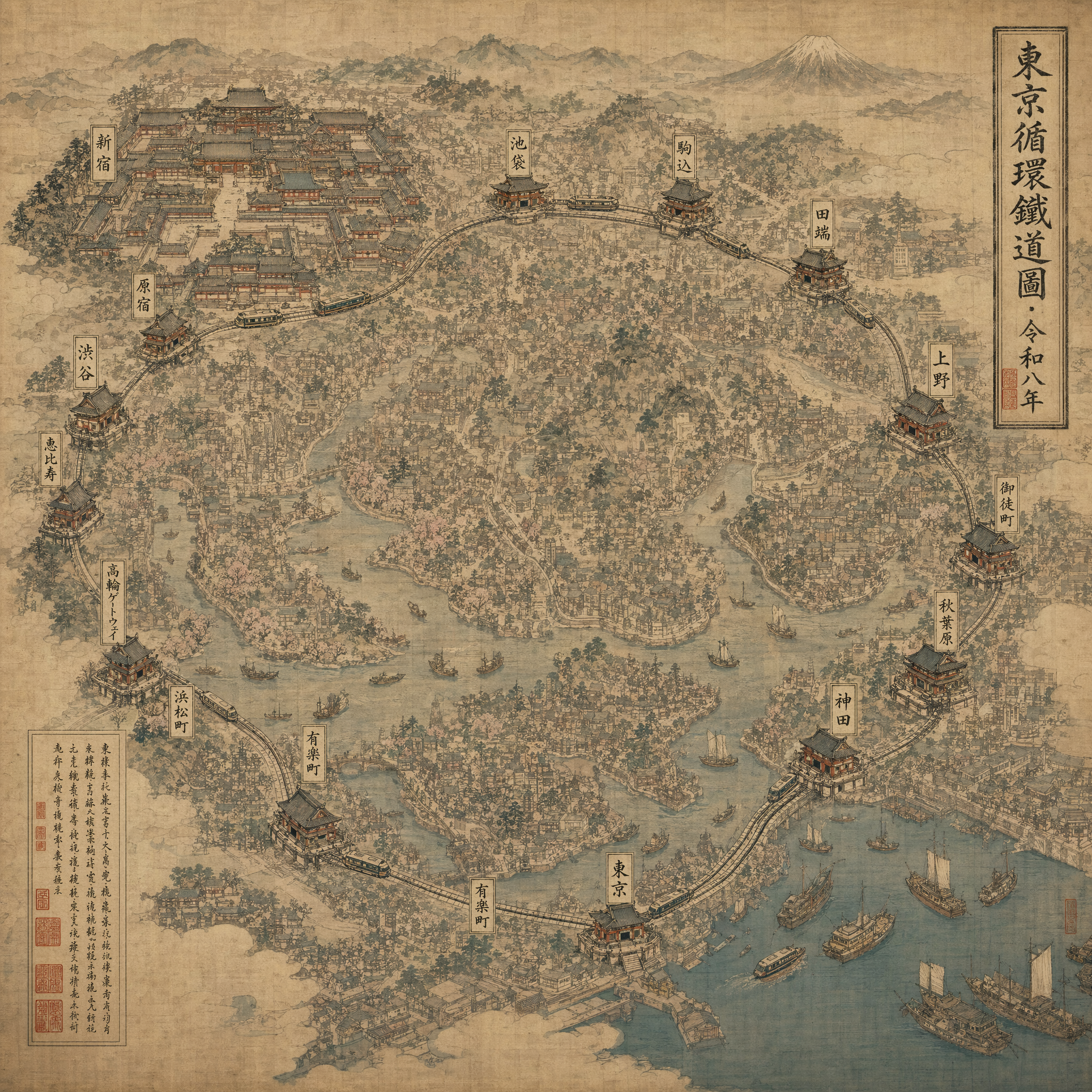
This shows off three things at once: historical-aesthetic accuracy, large-scale composition coherence (every Yamanote station visible as a pavilion), and correct CJK calligraphy.
How to adapt these to your own work
The template:
[Scene] at [time], shot [angle/framing]. [Subject + exact text in quotes]. [Materials/lighting/camera/film stock]. [Use case descriptor]. [Exclusions list].
Fill each slot. Aim for 40-120 words. If your prompt has no exact text, drop slot 2's quote part and lean heavier on slots 3 and 4.
Three anti-patterns to avoid:
- "Cinematic, ultra-detailed, 8K, masterpiece" — these are the AI-slop keywords that made sense for Stable Diffusion 1.5 in 2023. GPT Image 2 reads them as noise. Use real camera/lens/film references instead.
- Text without quotes — "a sign that says welcome" will produce a smudge. "A sign reading exactly 'Welcome'" produces legible text.
- No exclusions — models love to add watermarks, duplicate text, or hallucinate a second brand logo. End every prompt with what you don't want.
The full library, one click to try
We've published 40+ curated prompts with real generated outputs at nanowow.ai/gpt-image-2/prompts. Every card has a "Try this prompt" button that pre-fills the generator with the prompt, size, and quality, so you can iterate from a known-good starting point.
If you want to start from scratch, nanowow.ai/gpt-image-2 gives new accounts 5 free credits — enough to test 2-3 prompts before deciding whether to subscribe.
FAQ
Q: Is GPT Image 2 better than Midjourney for typography? For anything with real text (signs, posters, book covers, product labels), yes, by a wide margin. Midjourney still wins on purely illustrative / painterly styles where no text is needed.
Q: Can I use these prompts commercially? Yes — OpenAI's terms allow commercial use of GPT Image 2 outputs. The model reserves the right to block prompts that attempt to generate real copyrighted characters or trademarked logos.
Q: How do I handle subject-lock editing?
Switch the generator to "Edit" mode, upload your reference image, and set input_fidelity to 0.8-1.0 for pixel-level subject preservation, or 0.3-0.5 for allow more creative variation. We'll cover this in depth in a follow-up post.
Q: What's the best size/quality combo?
For speed: medium quality, 1024×1024. For print or 4K display: high quality, 3840×2160. Credits scale roughly 6× between standard and ultra.
Browse the full 40-prompt library: nanowow.ai/gpt-image-2/prompts · Start generating free: nanowow.ai/gpt-image-2