GPT Image 2 vs DALL-E 3: What Actually Changed in OpenAI's New Image Model
GPT Image 2 vs DALL-E 3: What Actually Changed in OpenAI's New Image Model
On 2026-04-21, OpenAI released GPT Image 2 (ChatGPT Images 2.0) — effectively the successor to DALL-E 3, which has been OpenAI's primary image model since 2023. Two years is a long time in AI. This post is a side-by-side comparison based on actual generations from both models, not marketing claims.
Short version: GPT Image 2 closes every major gap DALL-E 3 had, and opens a new one in subject-lock editing that no earlier model offered. If you're starting a new project, there's no reason to pick DALL-E 3 in 2026.
If you want to try GPT Image 2 directly, nanowow.ai/gpt-image-2 gives 5 free credits on signup — enough to compare against DALL-E 3's output for your own use case.
Where DALL-E 3 fell short
DALL-E 3 was industry-leading when it launched in late 2023. By late 2025, three chronic weaknesses had become obvious:
- Text rendering accuracy ~60%. Sign copy, movie posters, book covers — anything requiring legible typography had to be regenerated 10-20 times, or the text had to be edited in externally. Non-Latin scripts (Chinese, Japanese, Korean, Arabic) produced invented-glyph artifacts almost universally.
- Resolution capped at 1792×1024. Not even 2K. For print work or 4K displays, you had to run DALL-E 3 output through Real-ESRGAN or a similar upscaler and hope detail held up.
- No subject-lock editing. If you wanted a product shot against 10 different backgrounds, every regeneration was from scratch — the product's label, proportions, and lighting shifted each time. Ecommerce sellers couldn't use DALL-E 3 for variant photography.
GPT Image 2 was designed to fix all three. Let's look at each.
1. Text rendering: ~60% → ~99%
This is the single biggest upgrade and it's not close.
The test: Ask for a storefront sign with specific text in a specific typeface.
DALL-E 3 typical result: Text starts legible for the first 2-3 words, then dissolves into glyph-like shapes. Complex layouts (two-line signs, typography with quotation marks, apostrophes) fail more often than they succeed.
GPT Image 2 typical result: Full sign rendered correctly in one shot, including punctuation, multiple font weights, and visible typography specs like drop shadows. Here's a single-shot output:
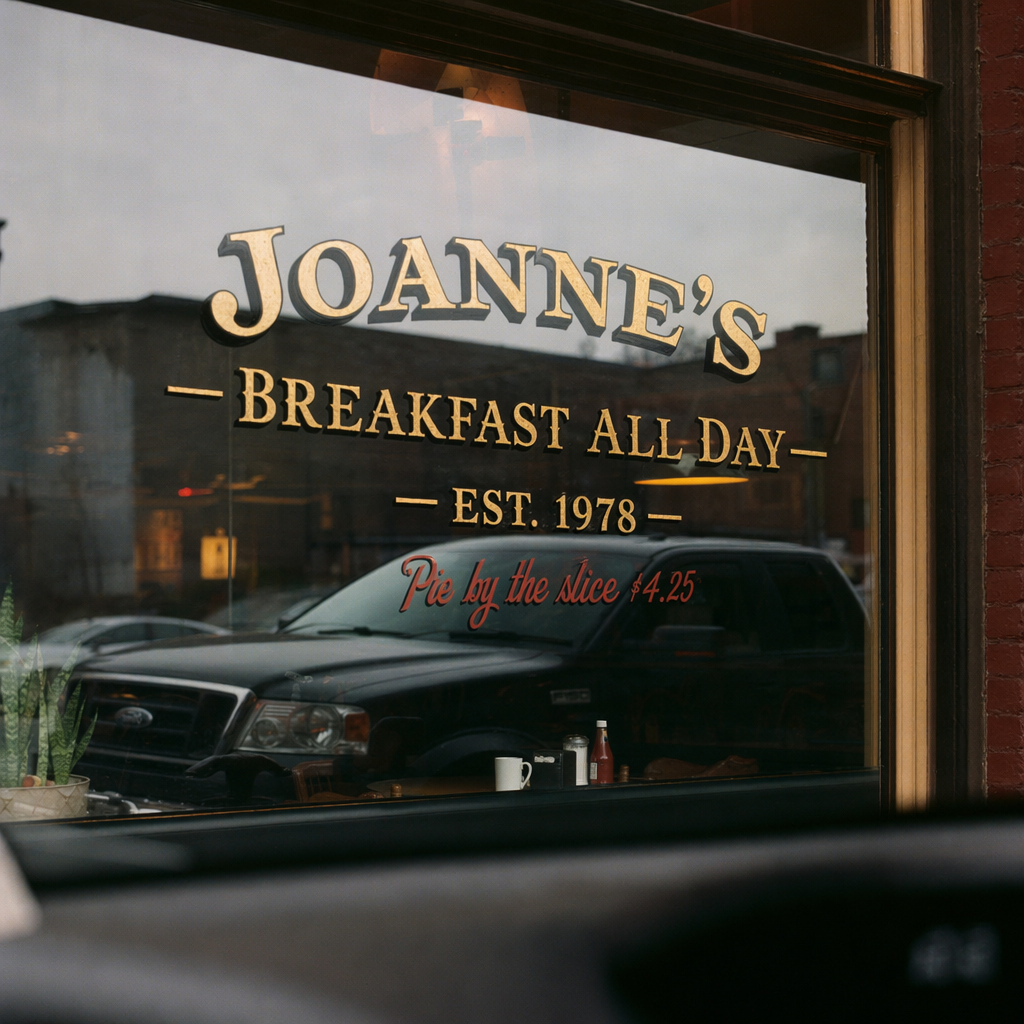
The prompt asked for two lines of different fonts ("JOANNE'S — BREAKFAST ALL DAY — EST. 1978" in gold-leaf serif, plus "Pie by the slice $4.25" in red cursive). Both render correctly, including the dollar sign, em dashes, and apostrophe. DALL-E 3 would produce at best one of the two lines legibly.
OpenAI's developer cookbook now documents a specific prompting pattern for this:
[Element] text (EXACT, verbatim): "<your text>"
That explicit "EXACT, verbatim" constraint is what unlocks the 99% accuracy. With DALL-E 3, no prompt phrasing reliably produced legible typography past 2-3 words.
2. Non-Latin scripts: broken → native
The second-biggest gap. DALL-E 3 never handled Chinese, Japanese, Korean, Arabic, Hindi text correctly — users learned to generate in English and composite foreign text in Photoshop.
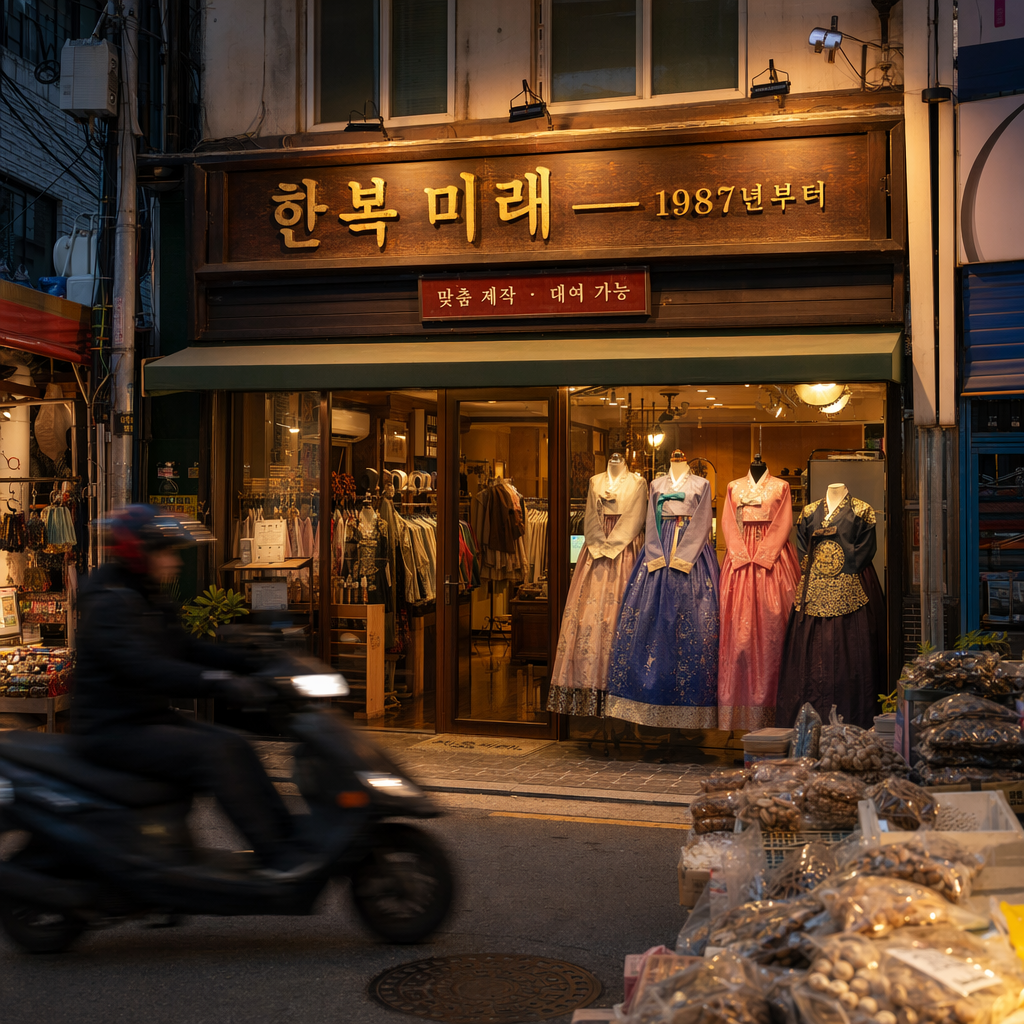
GPT Image 2 renders CJK and RTL scripts natively. Here's a Korean hanbok storefront:
And Arabic thuluth script in Cairo:
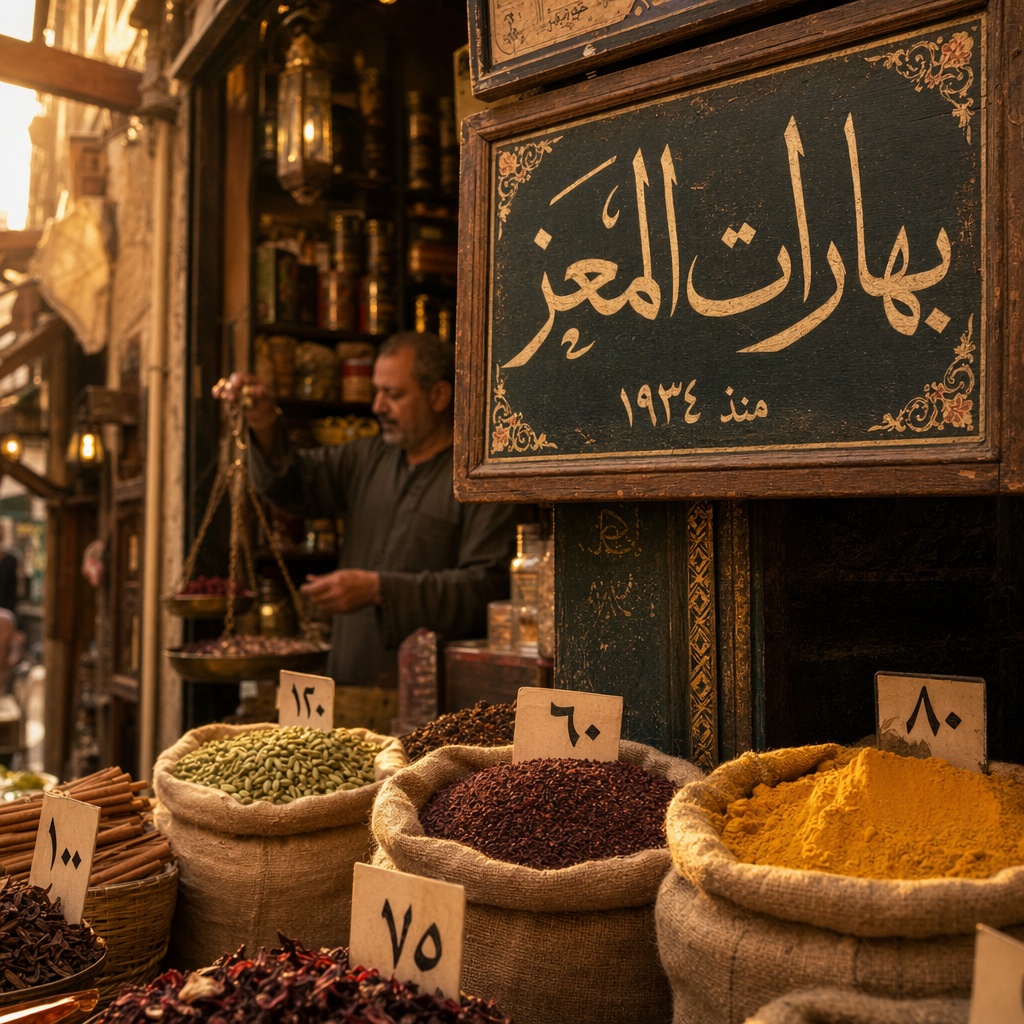
Two observations:
- Arabic renders right-to-left with correct ligatures — this is the part DALL-E 3 reliably failed.
- Mixed number systems (Arabic-Indic "١٩٣٤" for 1934) render correctly.
For anyone doing multilingual product photography, multilingual advertising, or content targeting non-English-speaking markets, this alone makes GPT Image 2 non-optional.
3. Resolution: 1792×1024 → 3840×2160
DALL-E 3's max resolution was 1792×1024 — uncomfortable for print and too low for modern large-format displays.
GPT Image 2 natively produces 4K (3840×2160) output. Not upscaled — actually generated at 4K by the model. A typical 4K product shot:
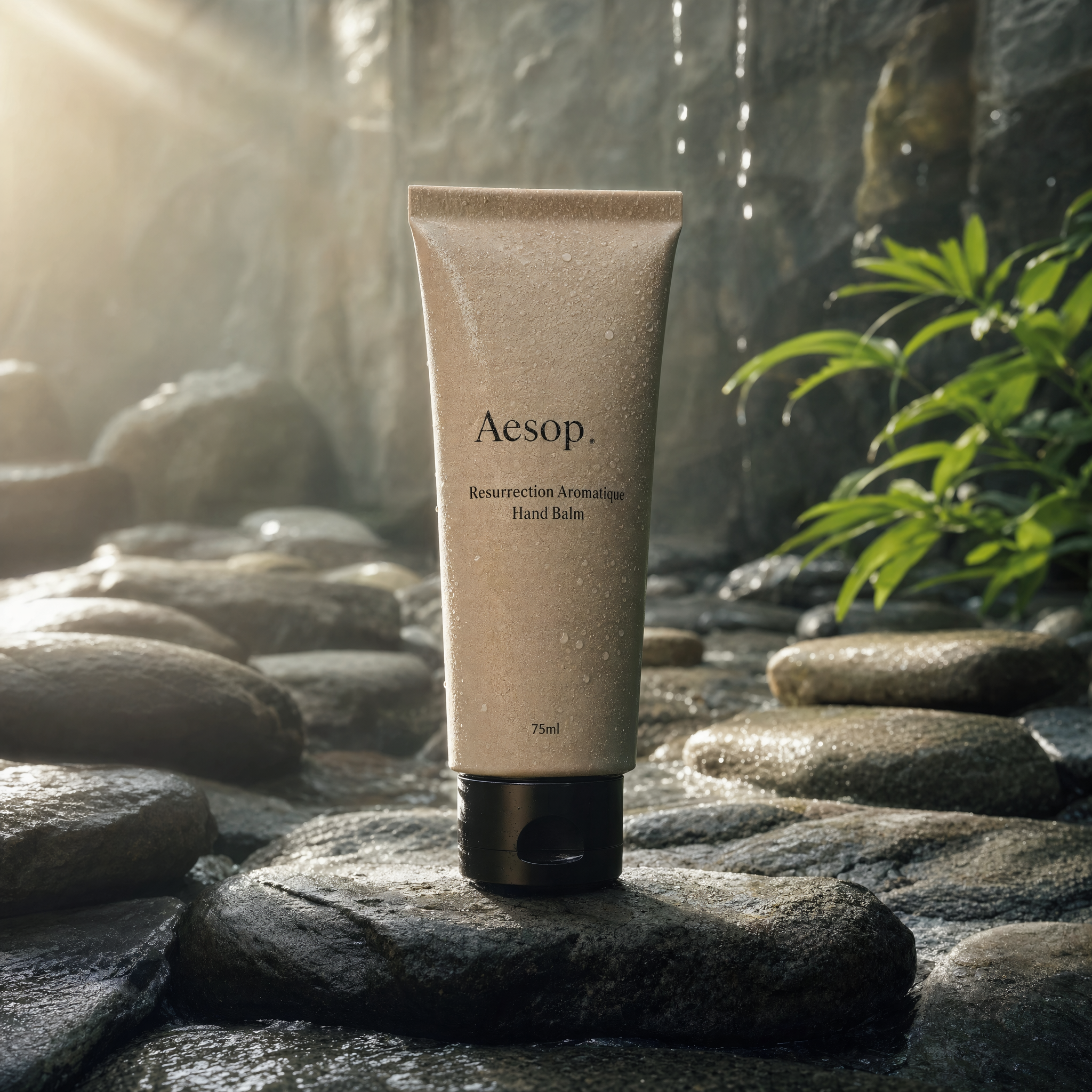
Pore-level texture on the ceramic tube is preserved at 4K. The water droplets have correct light refraction. The label text ("Aesop · Resurrection Aromatique Hand Balm · 75ml") reads cleanly at actual size. None of this was possible with DALL-E 3 at 1792×1024 without losing detail to upscaling artifacts.
For ecommerce sellers, print designers, and anyone doing editorial photography, this single upgrade lets you skip the entire Real-ESRGAN / upscaling post-processing step.
4. Subject-lock editing: new capability, no DALL-E 3 equivalent
This is the feature with no direct predecessor. GPT Image 2's Edit mode takes a reference image and an input_fidelity parameter (0 to 1):
input_fidelity: 0.8–1.0— keep the subject pixel-identical, change background, lighting, text on labels, etc.input_fidelity: 0.3–0.5— allow more creative variation
For ecommerce product photography, this is transformative. Take one product photo, generate 50 different background/lighting variations while guaranteeing the product itself doesn't drift between shots. For fashion, generate an outfit on different model poses, locations, or backdrops while preserving the garment's exact colors, textures, and pattern.
DALL-E 3's editing was limited to ChatGPT's inpainting — it regenerates the subject every time, with visible variance between regenerations.
5. Speed: ~10s → ~3s
Practical quality-of-life improvement rather than a breakthrough, but meaningful at scale:
| Mode | DALL-E 3 | GPT Image 2 |
|---|---|---|
| 1024 standard | ~10s | ~3s |
| 1792×1024 HD | ~15s | 2K equivalent ~6s |
| 4K | not supported | ~12s |
If you're iterating on a prompt 20 times to nail a design, 3× faster generation compounds. For production pipelines generating hundreds of variants, it changes the workflow's feasibility.
6. Transparent background
Small but meaningful: GPT Image 2 supports transparent background output directly via the background parameter. DALL-E 3 always produced a background — stickers, logos, and cutouts required manual masking downstream.
What DALL-E 3 still does well
It's not that DALL-E 3 is bad. Where it shines in 2026:
- Tight ChatGPT integration. If your workflow is "chat iteratively refine an image inside ChatGPT", DALL-E 3's conversational loop still works cleanly.
- Per-call API price. OpenAI's DALL-E 3 API is slightly cheaper per call for simple square 1K generations. If you're generating thousands of simple images with no typography requirements, the cost math favors DALL-E 3.
- Community prompt library. Two years of published DALL-E 3 prompts on Reddit, Lexica, etc. GPT Image 2's library is still growing.
For anything involving text, non-English content, ≥2K resolution, or subject consistency across generations, GPT Image 2 wins decisively.
Pricing comparison
| Provider | Standard 1K | HD/Premium | 4K |
|---|---|---|---|
| DALL-E 3 (OpenAI API) | ~$0.04 | ~$0.08 (1792×1024) | N/A |
| GPT Image 2 on fal.ai | ~$0.06 | ~$0.22 (HD) | ~$0.41 (Ultra 4K) |
| GPT Image 2 on Nanowow | 3 credits | 10 credits | 18 credits |
The headline: per-call prices are similar on the low end, GPT Image 2 costs more at high quality because you're getting resolution and fidelity DALL-E 3 never offered.
Practical decision tree
Do you need text in your images?
├─ Yes → GPT Image 2
└─ No
   │
   Do you need ≥2K resolution?
   ├─ Yes → GPT Image 2
   └─ No
      │
      Do you need subject consistency across generations?
      ├─ Yes → GPT Image 2
      └─ No
         │
         Is your use case "iterate in ChatGPT chat"?
         ├─ Yes → DALL-E 3 still fine
         └─ No → GPT Image 2 (faster, higher quality default)
95% of professional use cases land on GPT Image 2.
Try both side by side
If you want to see the difference on your own prompt, nanowow.ai/gpt-image-2 gives you 5 free credits on signup — enough for 1 HD generation or 2-3 standard ones. Browse 40 hand-curated GPT Image 2 prompts with their real outputs for inspiration, or jump straight to the generator.
For more on GPT Image 2's subject-lock editing — the one capability DALL-E 3 has no answer to — read our subject-lock guide (coming soon).
Full comparison matrix: nanowow.ai/compare/gpt-image-2-vs-dall-e-3. Try GPT Image 2 free: nanowow.ai/gpt-image-2.