Бесплатное удаление фона с изображения
Мгновенно удаляйте фон с любого изображения с помощью ИИ. Идеально подходит для фотографий товаров, портретов и многого другого. Получите 5 бесплатных кредитов!
Выбрать изображение
Перетащите или нажмите для загрузки
JPG, PNG, WEBP • Макс 10МБ
или попробуйте пример

Remove backgrounds in seconds, not hours
Say goodbye to tedious manual editing. Our AI-powered background remover automatically detects your subject and removes the background in just a few seconds. What used to take hours in Photoshop now happens with a single click. Whether you're preparing product photos for your online store or creating content for social media, get professional results instantly without any design skills.
Remove background free
Pixel-perfect edges, even on complex subjects
Our advanced AI handles the trickiest edges with precision. From flowing hair to delicate fur, intricate jewelry to fine details—get clean, natural-looking cutouts every time. No more rough edges or leftover background pixels. The AI intelligently identifies boundaries between your subject and background, delivering results that look professionally edited.
Try it now
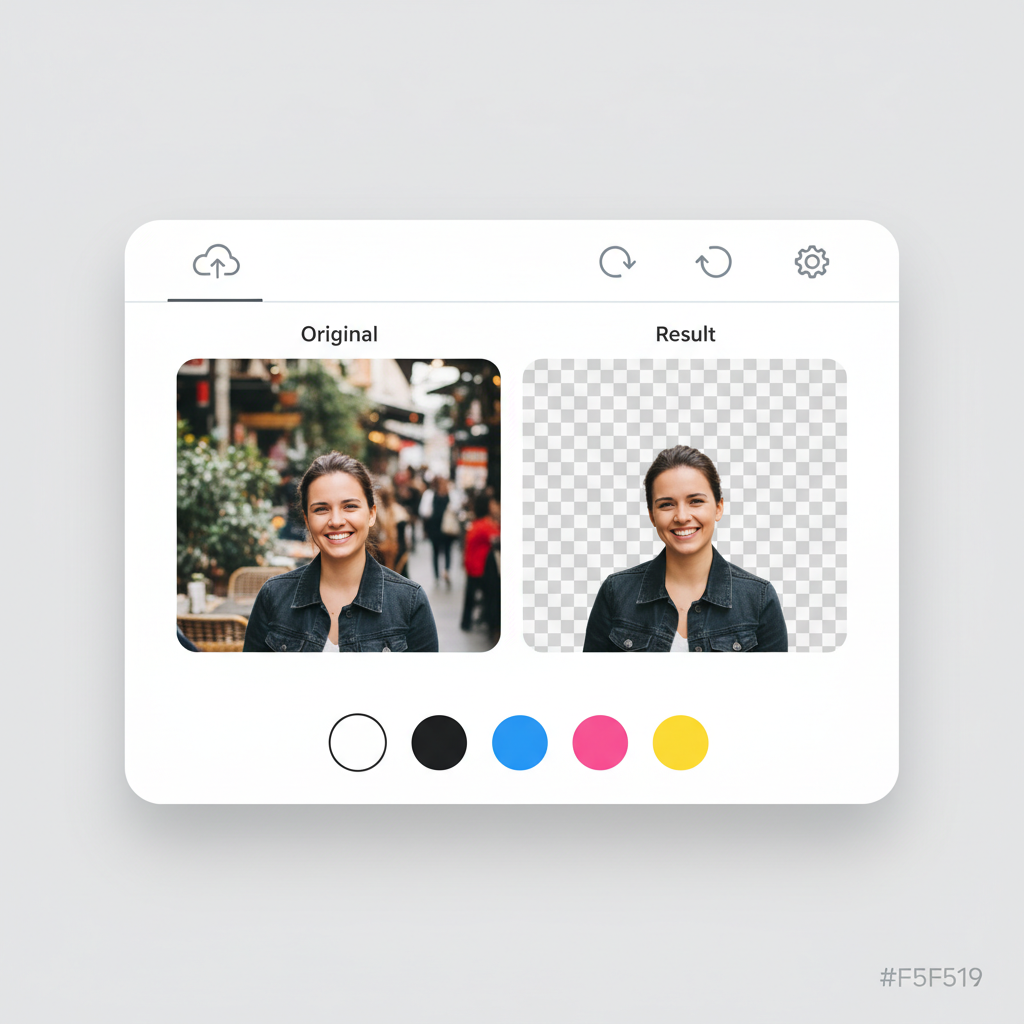
Transparent, white, or any color you need
Get exactly the output you need. Download with a transparent background for maximum flexibility, or choose a solid color that matches your brand or project requirements.
- E-commerce listings requiring white backgrounds
- Social media posts with branded colors
- Design projects needing transparent PNGs
- Professional headshots with clean backdrops
Professional results, completely free to start
No expensive software subscriptions. No complicated learning curves. Simply upload your image and let our AI do the heavy lifting. Sign up for free and get 5 credits to experience the magic. Each background removal uses just 1 credit. When you love the results (and you will), upgrade for more credits and features.
Get started freeНам доверяют тысячи
Наш инструмент удаления фона используют продавцы электронной коммерции, дизайнеры и создатели контента по всему миру
Точное определение объекта
Средняя скорость обработки
Поддержка больших изображений
Поддерживается JPG, PNG, WEBP
Присоединяйтесь к 10 000+ довольных пользователей, которые доверяют нашему ИИ для удаления фона
Как это работает
Удалите фон в 3 простых шага
Загрузите изображение
Загрузите фото или перетащите. Поддерживаются JPG, PNG и WEBP до 10МБ.
Обработка ИИ
Наш ИИ автоматически определяет и удаляет фон за секунды.
Скачайте результат
Выберите цвет фона и скачайте в формате PNG или JPG.
Поддерживаемые форматы
Максимальный размер файла: 10МБ
How Our AI Background Removal Technology Works
Our background removal tool uses a deep learning segmentation model trained on millions of images. The AI analyzes each pixel to classify it as foreground (the subject you want to keep) or background (what you want removed). Unlike simple color-based chroma key removal, our model understands object boundaries, depth, and context — which is why it handles complex scenarios like hair, glass, and shadows accurately. The entire process runs on cloud GPUs, delivering results in under 5 seconds regardless of image complexity.
Step 1: Загрузите изображение
Our system accepts JPG, PNG, and WebP images up to 10MB. When you upload, the image is sent securely to our processing servers. We automatically detect the image dimensions and color space to optimize processing. For best results, use well-lit images where the subject is clearly distinguishable from the background.
Step 2: Обработка ИИ
The AI segmentation model runs on enterprise GPUs, analyzing every pixel in your image. It creates a precise mask that separates the foreground subject from the background. The model handles challenging edges like hair strands, semi-transparent objects, and complex outlines with pixel-level accuracy. Processing typically takes 2-5 seconds.
Step 3: Скачайте результат
Once the background is removed, you can choose a transparent background (PNG), or apply white, black, or any custom color. Download your result in PNG format for transparency support, or JPG for smaller file sizes. The original image quality is fully preserved in the foreground subject.
Perfect for Every Use Case
From e-commerce to social media, our background remover works for all your projects
E-commerce Products
Create clean white backgrounds for marketplaces like Amazon, eBay, and Shopify. Meet marketplace requirements and increase conversion rates.

Portraits & Headshots
Professional profile photos and ID photos in seconds. Perfect for LinkedIn, resumes, and business cards.
Logos & Graphics
Create transparent logos for any project. Perfect for branding, marketing materials, and web design.

Social Media Content
Eye-catching posts with custom backgrounds for Instagram, TikTok, Facebook, and more.

Pets & Animals
Precise fur and hair detection for perfect cuts. Create adorable pet portraits and memories.
Objects & Items
Isolate any object for creative projects, presentations, or online listings.
Marketing Materials
Create professional flyers, banners, and ad creatives with clean cutouts. Place products and people on branded backgrounds for consistent marketing campaigns.
Real Estate Listings
Remove distracting backgrounds from property interior shots, furniture images, and staging photos. Create clean, professional real estate marketing materials.
Education & Presentations
Prepare clean images for slides, worksheets, and educational materials. Remove backgrounds from diagrams, photos, and illustrations for cleaner presentations.
Print-on-Demand Products
Isolate designs for t-shirts, mugs, phone cases, and other merchandise. Get transparent PNGs ready for print-on-demand platforms like Printful and Redbubble.
How Nano Banana 2 Compares to Other Background Removers
See how our AI stacks up against popular background removal tools
There are many background removal tools available, each with different strengths. Here is how Nano Banana 2 Background Remover compares to the most popular alternatives.
Nano Banana 2 vs Remove.bg
Remove.bg is one of the most well-known background removal tools and delivers good quality results. However, it limits free downloads to low resolution (up to 0.25 megapixels) and requires a subscription for full-resolution output. Nano Banana 2 provides full-resolution downloads from the start with a pay-as-you-go credit system — no subscription needed. Both tools offer comparable AI accuracy for most subjects, but Nano Banana 2 includes custom background color selection at no extra cost.
Nano Banana 2 vs Canva Background Remover
Canva offers background removal as part of its Pro subscription (2.99/month). While Canva is excellent as an all-in-one design tool, its background remover is just one feature among many. If you only need background removal, paying for a full Canva Pro subscription may not be cost-effective. Nano Banana 2 offers dedicated, high-quality background removal with a simple credit system, making it more affordable for users who specifically need this capability.
Nano Banana 2 vs PhotoRoom
PhotoRoom specializes in product photography and includes background removal, templates, and batch processing. It is a strong choice for e-commerce sellers who need a complete product photo editing suite. Nano Banana 2 focuses specifically on delivering the best possible background removal results with maximum flexibility — transparent, white, or custom color backgrounds with full-resolution output. For users who want a simple, fast, and affordable background removal tool without a monthly subscription, Nano Banana 2 is the better choice.
Nano Banana 2 Background Remover is designed for users who want professional-quality background removal without the commitment of a monthly subscription. Our credit-based pricing means you only pay for what you use, and every download is full resolution.
Tips & Best Practices for Background Removal
Get the best results from our AI background remover with these expert tips
Use Good Lighting
Well-lit images produce the cleanest results. Natural daylight or studio lighting helps the AI distinguish between the subject and background more accurately. Avoid heavy shadows that blend the subject with the background.
Ensure Subject-Background Contrast
The AI works best when there is clear visual contrast between your subject and the background. A dark subject on a dark background will be harder to separate than a dark subject on a light background.
Upload High-Resolution Images
Higher resolution images give the AI more pixel data to work with, especially around fine details like hair and edges. Start with the highest quality image available for the best output.
Simpler Backgrounds Work Best
While our AI handles complex backgrounds well, simpler, less cluttered backgrounds produce the cleanest results. If possible, photograph subjects against a plain or relatively uniform background.
Choose PNG for Transparency
Always download as PNG if you need a transparent background. JPG does not support transparency, so the transparent areas will appear white in JPG downloads. Use PNG when you plan to place the subject on a different background later.
Center Your Product in the Frame
For e-commerce product photos, center the product in the image and leave some padding around the edges. This gives the AI clear boundaries and makes the final image look more professional on marketplace listings.
Set Up an Efficient Workflow
For multiple images, keep the tool tab open and process images one after another. Each removal takes under 5 seconds, so you can process dozens of images in minutes. Download each result immediately for the fastest workflow.
Zoom In to Check Edges
After removal, zoom into the edges of your subject to verify the AI captured fine details correctly. Pay special attention to areas like hair, transparent objects, and areas where the subject color is similar to the background.
Remove backgrounds, then reimagine them. Place your product in trending lifestyle scenes with AI.
Explore More AI Tools
Discover our complete suite of AI photo editing tools
Frequently Asked Questions
Everything you need to know about our background remover
Ready to remove backgrounds?
Get started for free. No credit card required. Sign up and receive 5 free credits instantly.
Кредитная карта не требуется • 5 бесплатных кредитов • Обновляйте в любое время
Part of the Nano Banana 2 suite — free AI image tools powered by Google Gemini.